Applies to: Seclore Hot folder
Before files can be successfully protected through Seclore HotFolder, ensure that all required prerequisites are properly configured and validated on the HotFolder server.
Prerequisites for HotFolder protection:
1. Policy Server URL Accessibility
- The Policy Server URL configured in HotFolder must be accessible from the machine where HotFolder is installed.
- Validation Steps:
- Open the configured Policy Server URL in the browser present on the machine.
- If the URL is not accessible, contact your internal IT/network team.
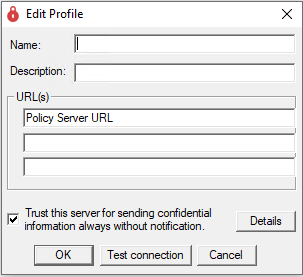
- To Check the Policy Server URL:
- Open HotFolder Server Enterprise Manager
- Navigate to
Settings → Configure Profile - Under the URL(s) tab, check the first configured URL
- Click Test Connection
- OR Copy the URL and manually open it in the browser
2. HotFolder Service Status
- The Seclore HotFolder service must be in a running state.
- Validation Steps:
- Open
Services.msc - Locate
Seclore Hot Folder Service - Verify that the service status is Running

- If the Service is Stopped, try starting the service manually.
- If the service fails to start, check Windows Event Logs and HotFolder logs for further troubleshooting.
- Open
3. Accessibility of Mapped/Network Drives
- The mapped drive or network location configured in HotFolder must be accessible from the HotFolder server machine.
- Validation Steps:
- Verify that the configured HotFolder path can be accessed directly from the HotFolder server.
- Ensure Network connectivity is available, Shared folders are reachable, Drive mappings are properly configured
4. NTFS Permissions for HotFolder Service Account
- The user account configured to run the HotFolder service must have appropriate NTFS permissions on the configured HotFolder location and all required subdirectories.
- Minimum Recommended Permissions: Read, Write, Modify.
- To Check the Service Account:
- Open
Services.msc - Locate
Seclore HotFolder Server - Right-click the service and select
Properties - Navigate to the
Log Ontab - Note the user account configured to run the service.
- Open
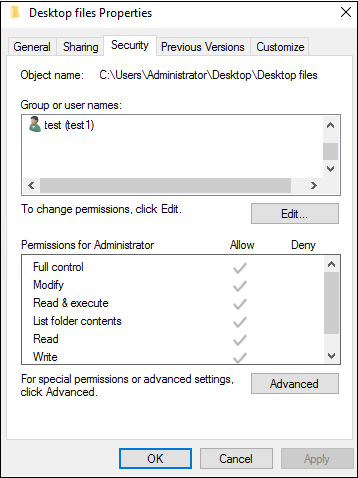
- To Verify NTFS Permissions:
- Navigate to the configured HotFolder location.
- Right-click the folder and select
Properties - Open the
Securitytab - Verify that the HotFolder service account has the required permissions.
Once all prerequisites are properly configured and validated, files placed in the configured HotFolder location should get protected successfully.
Need more help?
Contact Seclore Support
 support@seclore.com | Chat Live